Sign-in and access
TL;DR
- Sign-in providers are
[auth.providers.<name>]tables: OpenID Connect, plain OAuth2, GitHub, or the Discord, Google and Microsoft presets. - A provider needs
EXACTDOCS_PUBLIC_URL; register<public_url>/api/v1/auth/<name>/callbackat the provider. - Each provider admits people by
allowed_groups, by GitHub membership filters, or byallow_any_user = true. - Behind Cloudflare Access, ExactDocs can sign people in by the identity Access already checked.
[auth.library_creation]limits who may create libraries; by default every signed-in user may.
Sign-in providers
People can sign in through OpenID Connect providers as well as with a password;
Getting started shows a complete
example and what happens at sign-in. Each provider is a [auth.providers.<name>] table in the
TOML file, or EXACTDOCS_AUTH__PROVIDERS__<NAME>__<FIELD> in the environment, where lists are
JSON (EXACTDOCS_AUTH__PROVIDERS__CORP__ALLOWED_GROUPS='["docs-readers"]'). The name is
lower-case letters, digits and hyphens, and it appears in the callback URL. A provider that is
not valid stops the server at start, with a message naming the field.
| Field | Default | What it does |
|---|---|---|
kind |
required | oidc, oauth2, or github, using authorization code + PKCE S256.ADFS 2016+ is oidc.discord, google and microsoft are presets: see Discord, Google and Microsoft |
display_name |
the name | What the button says: Sign in with display_name. A preset's default is Discord, Google or Microsoft |
auto_create_users |
true; false for the presets |
Create an account at an identity's first sign-in. When false, only identities people linked to their account in Account settings sign in; anyone else is refused with not_linked.With it false and no allowed_groups, everyone the provider vouches for may link |
icon |
the preset's; github for github |
A built-in icon for the provider's buttons: discord, github, google or microsoft |
icon_file |
unset | An icon of your own: a PNG, WebP or SVG file of at most 64 KiB and 512x512 pixels, read at start and served by ExactDocs itself (/api/v1/auth/<name>/icon), never from the provider.Its type is told by its content; an SVG is rebuilt from an allowlist (shapes, gradients, references to its own #ids; no scripts, event handlers, styles, external links or DOCTYPE).A file that does not pass stops the server at start. Not together with icon |
issuer |
required for oidc |
OIDC discovery issuer; OAuth2 stable linking namespace (default: token URL origin). HTTPS; plain HTTP only to loopback for development |
client_id |
required | The client ID registered at the provider |
client_secret |
unset | The client secret, from the environment only (EXACTDOCS_AUTH__PROVIDERS__<NAME>__CLIENT_SECRET).Leave it and client_secret_file unset for a public client |
client_secret_file |
unset | A file holding the client secret, read at every use (Docker and Kubernetes secrets). Not together with client_secret |
scopes |
["openid", "profile", "email", "offline_access"] |
OIDC requires openid; OAuth2 always adds offline_access for revalidation.GitHub uses read:user read:org |
allowed_groups |
[] |
Groups, as the provider names them, whose members may sign in |
allow_any_user |
false |
Admit everyone the provider vouches for. Either this, allowed_groups, or GitHub membership filters is required |
admin_groups |
[] |
Members of these groups get the role admin, everyone else user, decided again at every sign-in and revalidation |
groups_claim |
groups |
The claim holding the groups, a dotted path (Keycloak: realm_access.roles; ADFS: group).Read from userinfo when the ID token lacks it |
group_prefix |
empty | Put before each group name ExactDocs stores for the account (for example corp:).Matching against allowed_groups and admin_groups uses the provider's names |
username_claim |
preferred_username |
The claim that names a new account (ADFS: upn or unique_name); without it, the local part of the email.Read only when the account is created |
email_claim |
email |
The email claim |
revalidate_minutes |
60 |
How often the groups are checked again with the stored refresh token |
revalidate_grace_minutes |
1440 |
How long access lasts without a successful check (the provider is unreachable, or it gave no refresh token). After that, access ends until the next sign-in |
OAuth2-only sign-in
For kind = "oauth2", set authorization_url, token_url, and userinfo_url to the provider's
HTTPS endpoints (HTTP loopback is allowed for development). Set client_id and a secret as above.
subject_claim defaults to sub; username_claim, email_claim and groups_claim use the
same defaults as OIDC. Claim names can be literal keys or dotted nested paths. A literal key wins
when both exist. The subject must be a nonempty string; it, together with issuer, links the
account. Email and username changes never link another account.
client_auth_method is client_secret_basic by default; use client_secret_post if required by
the token endpoint. Configure scopes as needed; offline_access is always requested. The
provider must return a refresh token for continuing web revalidation; otherwise access ends after
the configured grace period. Refresh tokens are sealed, and a refreshed subject change is refused.
GitHub and GitHub Enterprise sign-in
Create an OAuth App in GitHub's developer settings. Register
<EXACTDOCS_PUBLIC_URL>/api/v1/auth/ghe/callback as its authorization callback URL (ghe is the
provider name below). Configure the client secret through the environment or a mounted secret:
[auth.providers.ghe]
kind = "github"
display_name = "GitHub Enterprise"
base_url = "https://github.example.com"
client_id = "your-oauth-app-client-id"
client_secret_file = "/run/secrets/github-client-secret"
allowed_orgs = ["acme"]
allowed_teams = ["acme/docs-readers"]
admin_groups = ["github:acme/docs-admins"]
Use base_url = "https://github.com" for GitHub.com (API https://api.github.com). Enterprise
Server derives <base_url>/api/v3; data-residency Cloud https://<sub>.ghe.com derives
https://api.<sub>.ghe.com. An explicit api_url overrides this. Identity links use the API URL
and numeric user ID, so login renames keep the account. Changing the API URL changes that identity
namespace. GitHub Apps are outside this integration; use an OAuth App with read:user read:org.
Each configured organization, including organizations of allowed_teams, is checked first for
active membership. Teams are then read from paginated /user/teams, with an individual team
membership fallback. At least one configured team is required when allowed_teams is set. A
verified configured team becomes group github:<org>/<team>; include admin teams in
allowed_teams to make their groups available to admin_groups. If allowed_groups is also
set, it is an additional admission requirement. group_prefix applies as for OIDC. With no
membership filters, explicitly set allow_any_user = true; it never bypasses configured filters.
For an organization that restricts OAuth Apps, an organization owner must approve the ExactDocs OAuth App under Organization settings → Third-party access → OAuth app policy. A refusal names the organization and says it has not approved the app. For a SAML-enforced organization, authorize the app using Settings → Applications → Authorized OAuth Apps → Configure SSO. An SSO refusal asks the person to authorize SSO for that organization. These are separate from a missing organization/team membership; provider messages and SSO URLs are never rendered directly.
The non-expiring OAuth App access token is sealed and used for periodic membership checks. Losing membership or explicit token revocation ends web sessions and refuses API tokens on the next check; transient provider outages retain access only within the existing bounded grace period. The local password admin remains available for recovery.
Discord, Google and Microsoft
These presets need only the client ID and secret (and, for Microsoft, the tenant); they set the
endpoints, scopes, claims, display name and icon themselves, and refuse an issuer or endpoint
set by hand. Register <EXACTDOCS_PUBLIC_URL>/api/v1/auth/<name>/callback as the redirect URI at
the provider.
[auth.providers.google]
kind = "google"
client_id = "1234.apps.googleusercontent.com"   # the secret from the environment, as above

[auth.providers.discord]
kind = "discord"
client_id = "112233445566778899"

[auth.providers.microsoft]
kind = "microsoft"
tenant = "organizations"
client_id = "00000000-0000-0000-0000-000000000000"
googleis OpenID Connect athttps://accounts.google.comwithopenid email profile, and asks for offline access (Google sends a refresh token only at a person's first consent).discordis OAuth2: the subject is the Discord user ID, the username itsusername, with theidentify emailscopes. Discord has no groups.microsoftis OpenID Connect at Microsoft Entra ID.tenantis required: the directory (tenant) ID, a GUID, for one organization;organizationsfor any work or school account;commonfor those and personal accounts;consumersfor personal accounts only. Withorganizationsorcommon, each token's issuer names the person's own tenant (from itstidclaim), so the same subject in two tenants is two identities. Groups come from thegroupsclaim when the app registration emits it.
A preset creates no accounts (auto_create_users = false): anyone with a Google, Discord or
Microsoft account could otherwise get one. People sign in with another method (a password, or
your own identity provider) and link the provider under Account settings → Sign-in; from
then on it signs them in to that account, which keeps its own role and groups. To let a preset
create accounts, set auto_create_users = true together with allowed_groups or
allow_any_user = true (for Microsoft, usually with a single-tenant tenant).
Linking providers to an account
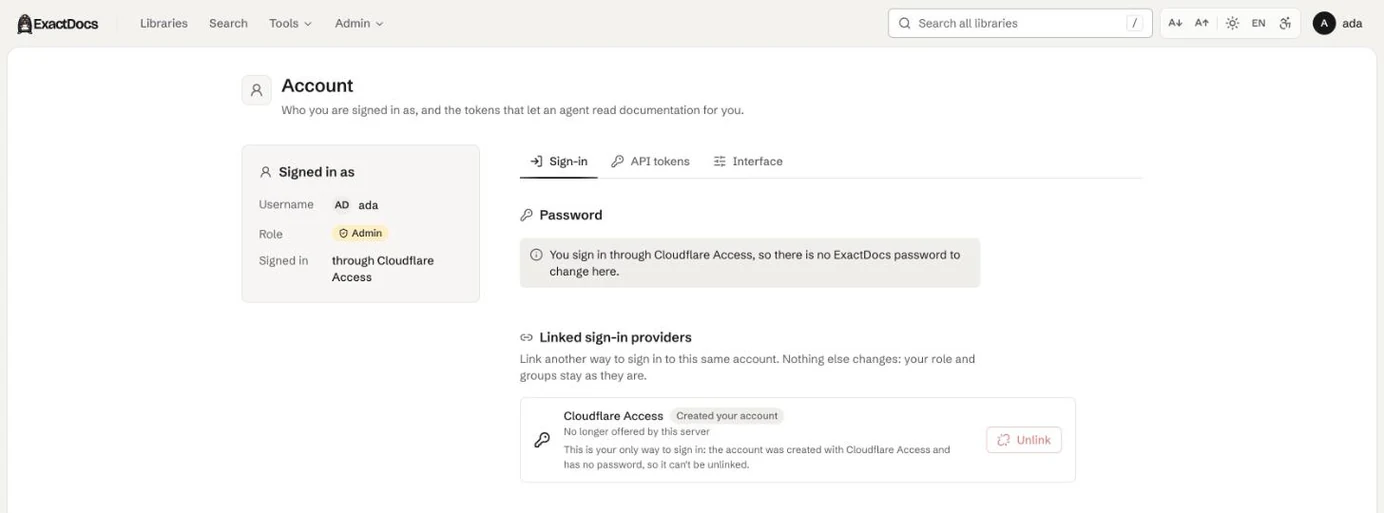
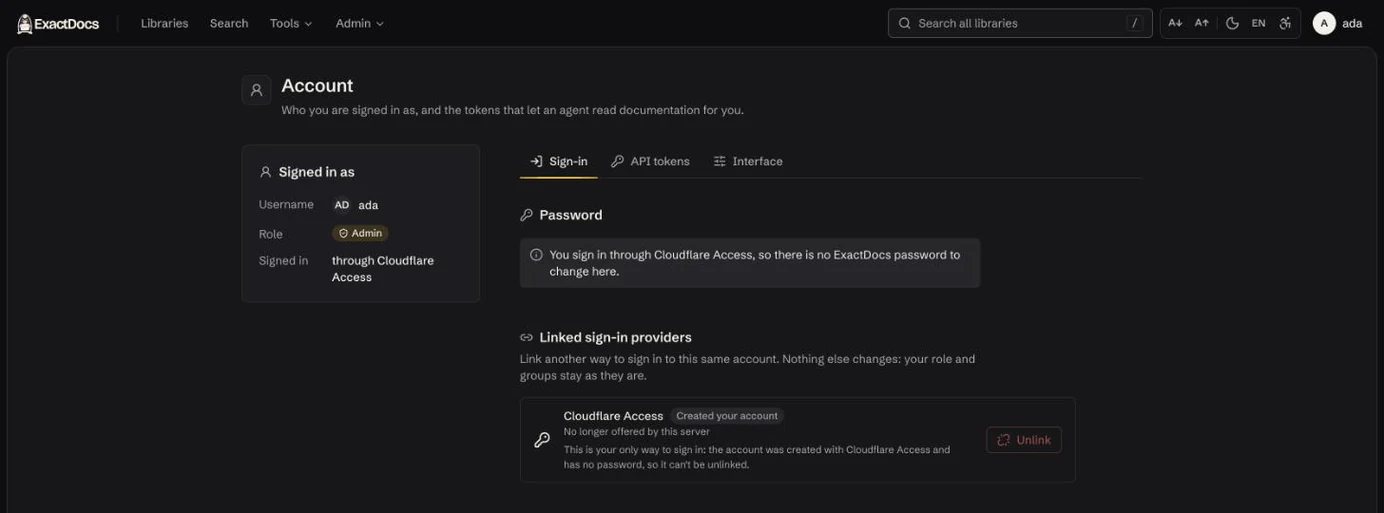
Every account has at most one identity per provider. The one it was created through (by a first sign-in, or by Cloudflare Access) is its origin: an account without a password follows it, its role, groups and access, and it can never be unlinked. Any other configured provider can be linked from Account settings, and unlinked again (after a confirmation); a linked identity only signs the account in, and its groups and role at the provider are not used. An identity that is already linked to another account is refused. Linking needs a signed-in session: the provider's callback must come back to the same browser session that started it. See REST API (Linked sign-in providers).
Two settings apply to all providers:
| Variable | Default | What it does |
|---|---|---|
EXACTDOCS_AUTH__REVALIDATE_POLL_SECONDS |
300 |
How often the server looks for accounts whose groups are due a check |
EXACTDOCS_MCP_OAUTH_PROVIDER |
unset | The name of one provider that web MCP hosts (Claude, ChatGPT) sign in through with OAuth. It needs a client secret. See MCP |
Cloudflare Access
When ExactDocs runs behind Cloudflare Access, it can
sign people and MCP clients in by the identity Access already checked, so nobody signs in twice
and MCP clients need only the Access service-token headers. It is off unless the
[auth.cloudflare_access] table exists (or EXACTDOCS_AUTH__CLOUDFLARE_ACCESS__<FIELD> in the
environment, where lists and tables are JSON). An invalid value stops the server at start, with
a message naming the field.
[auth.cloudflare_access]
team_domain = "https://acme.cloudflareaccess.com"
audience = ["4714c1358e65fe4b408ad6d432a5f878f08194bdb4752441fd56faefa9b2b6f2"]
admin_emails = ["ada@acme.com"]
auto_create_users = true

[auth.cloudflare_access.service_tokens]
"88bf3b6d86161464f6509f7219099e57.access" = "ci-bot"
| Field | Environment | Default | What it does |
|---|---|---|---|
team_domain |
EXACTDOCS_AUTH__CLOUDFLARE_ACCESS__TEAM_DOMAIN |
required | https://<team>.cloudflareaccess.com.The tokens' issuer ( iss); the signing keys are read from <team_domain>/cdn-cgi/access/certs |
audience |
..._AUDIENCE='["<aud>"]' |
required | The Access application's Application Audience (AUD) tag, one or more. A token must name one of them |
admin_emails |
..._ADMIN_EMAILS='["ada@acme.com"]' |
[] |
People with these emails (compared case-insensitively) get the role admin; everyone else Access signs in is a user.Decided again at every visit |
auto_create_users |
..._AUTO_CREATE_USERS |
true |
Create an account at a person's first visit. When false, only people whose account was created earlier get in |
service_tokens |
..._SERVICE_TOKENS='{"<client id>": "ci-bot"}' |
{} |
Access service token client ID (<id>.access, the token's common_name) to the username of an existing account it acts as.An unlisted service token signs nobody in |
How a request is checked and linked:
- ExactDocs reads the token from the
Cf-Access-Jwt-Assertionheader, or else theCF_Authorizationcookie. It is accepted only with a valid RS256 signature by a key of the team's certs (cached, fetched again when a token names an unknown key, at most once a minute, with a 10-second timeout), anissequal toteam_domain, anaudamongaudience, and validexp,nbfandiat(60 seconds of clock skew). A token that fails any check is logged with the reason, never the token, and the request is treated as if it had none. - A person is linked to an account by the Access
sub(stable for the person within your team), never by the email: the samesubalways reaches the same account, even if the email changes. The first visit creates the account, named by the email (or its local part, or<local part>@cloudflare-accesswhen those are taken); an existing account is never taken over by its name. It has no password and shows as providercloudflare-accesson the Users page. A disabled account is refused. - A service token acts as the mapped account, with that account's role and library roles. The account must exist and not be disabled.
- A session cookie, an API token or an OAuth bearer the request carries still wins: Access signs in only a request that has none of them. A wrong API token is refused, never replaced by the Access identity.
- An account created by Access keeps its API tokens working for 30 days after its owner last came through Access (Access itself keeps a removed person away from the origin).
Who may create libraries
By default every authenticated user may create a library and becomes its owner. Operators can restrict creation in the configuration file:
[auth.library_creation]
users = ["stable-account-id"]
groups = ["corp:docs-admins"]
A user matching either list may create libraries. users contains exact stable account IDs,
not usernames (the users API exposes each account's id). For an unlinked verified MCP OAuth
identity, its stable ID is <provider>:<subject>. groups contains ExactDocs' exact mapped group
names, including the provider's group_prefix. Browser sessions and API tokens use the account's
current stored groups; verified MCP OAuth requests use their verified token's mapped groups and
role instead. Disabled accounts cannot create libraries.
The environment equivalents are EXACTDOCS_AUTH__LIBRARY_CREATION__USERS='["stable-account-id"]'
and EXACTDOCS_AUTH__LIBRARY_CREATION__GROUPS='["corp:docs-admins"]'. An omitted
auth.library_creation section preserves existing access. Supplying an empty section (or
EXACTDOCS_AUTH__LIBRARY_CREATION='{}') permits only operators. Operators retain creation
permission regardless of these lists. Local internal commands, stdio MCP and scheduled jobs
retain their existing instance access. Read-only repository checks and previews remain available;
adding a library is checked before Git access, credential storage or import queueing, including
additions made by sources apply. Changing this configuration requires restarting the server.